Showing posts with label battle of the pm tools. Show all posts

Tuesday, July 20, 2010

LiquidPlanner vs. Wrike, the Battle of the Online Project Management Tool Continues

Next in my little battle for the title of the best project management tool, I took a look at Wrike and compared it to LiquidPlanner. If you’ve read any of my posts before you know that the battle is a little uneven, I am clearly biased towards LiquidPlanner but I do try to take a fair look at each tool. I also like to keep this as a friendly forum for discussion, so if anyone out there from Wrike wants to pop in a comment here and clarify anything about my descriptions, feel free.
I will be comparing the following features:
  • Task Management / Schedule Building
  • Collaboration
  • Reporting
  • Mobile & Misc
Task Management / Schedule Building

Creating new tasks is pretty quick and simple with Wrike, I specify a title, assignee, start and due date, duration, status, priority, included in, shared with, and description with a rich text edit box. I am allowed to set a recurrence on the task, which is kind-of handy. The duration is a single-point estimate of course. I have yet to find a project management tool that will allow me to have a ranged estimate for a task like LiquidPlanner does. This builds in a level of uncertainty into the schedule which is critical to keep projections realistic, and will keep the project manager from continually going back to revise the schedule when estimates change.
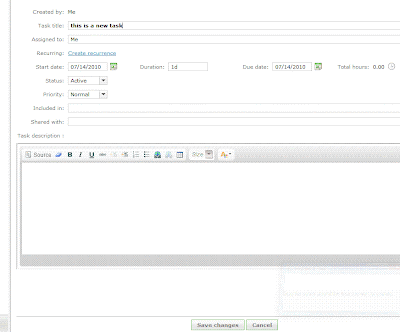

The “priority” field has 3 options - Normal, High and Low. This is a handy feature to be able to flag the task, but it does not make it go any higher in the list of tasks. A personal task list is ordered by due date, which makes sense at a basic level. If tasks need to be re-prioritized then the due dates need to be edited for each task individually, or the end dates adjusted via the timeline. I had fun dragging the little blocks around the timeline but the problem here is that the timeline is only as realistic as I set it to be. The timeline does not take into account the durations of tasks, the resources assigned to them and the other workload or work schedule of those resources, office holidays, etc. There is no way to see if any of the tasks are at risk of being completed by their due date, until they are actually overdue and then they turn red.
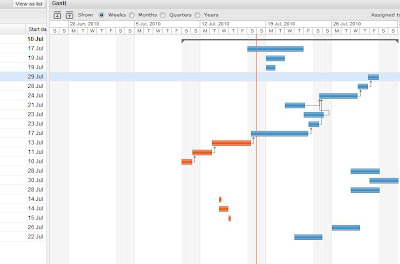

With LiquidPlanner, making a task highest priority is done simply by dragging it to the top of the task list. When this happens, the expected completion date for that and all other tasks updates appropriately. The expected completion date takes into account the other tasks assigned to that resource, working schedule of the resource, delay until date, and any other outside dependencies. The date calculated and schedule created shows a much more realistic picture of when things will get done, not just when we hope they will get done. Any items that are risk of not being completed by their promise date will immediately turn red and will remain that way until priorities are shifted or dates revised.
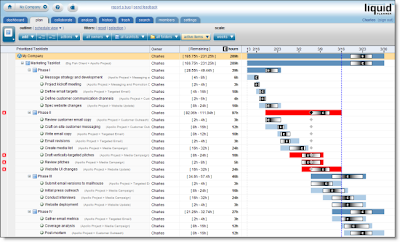

Wrike has a feature called “Flexible Structures”, which allows the manager to build hierarchies of tasks and simultaneously put a sub-project and a task in many projects. Tasks can be sorted in many ways. LiquidPlanner also allows the manager to organize tasks into a folder view and a task list view. So, projects are built and organized in the “Organize” view and then priorities are set and adjusted in the “Task” view.

Collaboration

Wrike has a “Discussions” tab for each task, and a tab where files can be uploaded. LiquidPlanner has additional levels of collaboration for each task, project folder, and root of the project. LiquidPlanner includes:
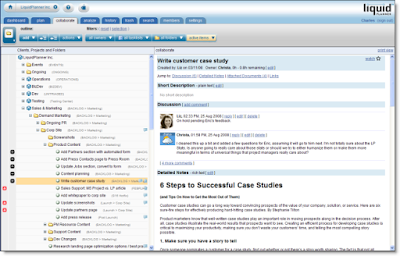
  • Description (plain text edit)
  • Discussion (Twitter type comment stream)
  • Detailed Notes (rich text edit)
  • Links
  • Attached documents


This keeps the collaboration rich & organized. Wrike is launching an “Activity Stream” feature with it’s new version, which will show all activity over all projects and also include comments or discussion. This is a nice way to watch everything but I didn’t see a way to sort this stream by project/user/etc.

LiquidPlanner has a client portal system, a great way to collaborate with clients while controlling exactly what they can view & edit. Wrike does allow clients to be invited to the workspace to view projects, but as far as I can tell there is no portal-type system setup with controls over what elements can be viewed, edited, etc.

Reporting

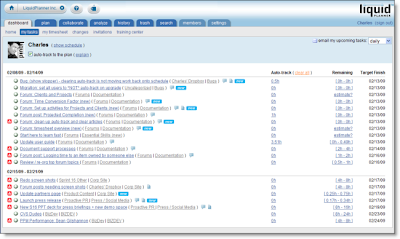
Wrike has a nice sized list of filters available, all prebuilt and accessible from the left column. This is handy, but what I personally find more practical and useful is the prebuilt (and very slick) reports and custom filters that can be setup with LiquidPlanner. LiquidPlanner includes the ability to sort by task owner, project folder, task list and status (active, complete, flagged, work remaining, etc).

LiquidPlanner has a free iphone app, Wrike reports to be working on their app.
Both systems include timesheets.

Summary

Although I found the Wrike interface clean and fairly easy to use, LiquidPlanner still has more of the features that are important to me in the type of project management work that I do, with constantly shifting priorities and tasks that need to need ranged estimates. And with all the talk of project collaboration tools, LiquidPlanner is pretty packed with great (and very organized) ways to collaborate.

What do you think?

Thursday, April 29, 2010

LiquidPlanner vs. Clarizen, a comparison of two Project Management Tools

Since I've been serving proudly as the LiquidPlanner Social Media Evangelist for almost a year now, I wanted to take some more time to evaluate other online project management tools and get a better understanding of what the competition is like in the space. This post will not be another comparison of Basecamp, I think I've made it pretty clear that Basecamp shouldn't even really be called a project management tool, but merely a decent collaboration system, lacking in critical project management features & functionality.

Clarizen was next on my list, so I spent some time checking it out. The interface is fairly clean and loading time is decent, but my first real impression was how much it looked like a web based version of MS Project. Personally, that scares me, but it might be a draw for others.

Both tools have task & resource management, time tracking, collaboration, gantt view, reporting, and a way to include clients in project collaboration. Clarizen also has a fairly full suite of Budget Management tools which LiquidPlanner does not yet have.

What I spent the most time evaluating was task scheduling and management, since I think these are the most powerful features of LiquidPlanner and I'm always curious to see how other systems handle them.

To setup a task in Clarizen, you need to have a start and end (due) date, duration and work. The first thing I noticed is a default task in the system that is 40 hrs of work, assigned to one person, and set to last 5 working days. I changed the work to 60 hrs and the other values didn't change, and there was also no flag that the task was at risk of not being met. In LiquidPlanner, to setup a similar task I would give it a "delay until" date, promise date, high/low work estimate and put it in the proper priority order. From here, LiquidPlanner will calculate expected finish date, based on the hours per week that the resource works, any other tasks in the workload, and of course the amount of hours the task is expected to take. If I take a 40 hour task and make it into a 60 hour task on LiquidPlanner, the expected finish date would automatically get pushed back to the following week. Tasks can be due on a certain date, but I can't force them to finish on that date without moving up the 'delay until' date and/or re-prioritizing tasks. And, I really like that feature of LiquidPlanner, because it communicates the reality of the schedule, that you can't always force something to be done by a certain date (unless you want to sacrifice quality, quantity, other work, your team member's sanity, I could go on...).

Next, I wanted to reprioritize the tasks assigned to one of my team members. I found on Clarizen that it took a lot of clicks to get to the list of tasks for one specific user, then once I was there I was not able to easily shift (drag & drop) tasks around like I am able to do with LiquidPlanner. Now, this feature is very important to me because where I work there are constantly shifting priorities so I need to be able to easily move the tasks around to ensure that the critical items get finished on time. Clarizen does allow tasks to be reordered on a team member's list, but it takes a couple more steps than the drag & drop.

In Clarizen the tasks can be given the designation 'at risk' but it looks like this must be done completely manually and not automatically if the resource assigned to that task is overloaded with work. With LiquidPlanner, tasks are automatically marked 'at risk' by the system if the promise date is after the expected finish date. The task can also manually be marked at risk or assigned any other relevant alert.

Something interesting about Clarizen was the ability to assign multiple properties to a task, such
as Project Phase, Pending (Customer approval, feedback, testing, etc) and Type (Define, Design, General, Integration, etc.). What I didn't see was a way to customize the items in these drop-down lists, so the user is tied to these specific properties.

I've heard many seasoned project managers say (and even some programmers guiltily admit) that a task is always going to be reported as 90% complete, until it's finally finished. There are many who adhere to the idea that tasks are either 0% or 100% complete, and never anything in the middle. Percent complete is just an inaccurate way to report progress on a task. Rather, report hours worked and estimate (high/low is ideal, of course) of hours to complete. So, I admit, I had to chuckle when I saw that Clarizen was using a percent complete field with each task, and allowed me to arbitrarily update the value without recording any time worked or time remaining. LiquidPlanner stays away from the percent complete model, the only percentages you will see attached to a task is the calculated probability of a task being completed by a specific date. So, you can report to your execs that task A has a 10% chance of being finished by next Friday, a 50% chance of being finished by the following Wednesday, etc. In my opinion (and many other project managers) much more useful information than having the task owner report something like their task is "65% complete."

I mentioned at the beginning of this post that both tools have reporting features. If you look at the reports page on the Clarizen system and compare to the reports in LiquidPlanner, you might be blown away at the sheer number of reports available on Clarizen. What will become obvious after taking a closer look at LiquidPlanner is that many of these same reports are available, with even more customization, by using the drop-down lists in the "Plan" view to filter to the exact view that you're looking for. These custom views can be saved and easily accessed later. The prepackaged reports that LiquidPlanner does have are pretty slick, and Clarizen doesn't have the proper data to generate reports like that. To Clarizen's credit though, there are financial reports available in that system that are not yet in LiquidPlanner, but once LiquidPlanner launches additional financial tools this will not be an issue.

The bottom line here is that it's all about what your needs are as a project manager and what type of organization you're working in. If you're looking for a tool that closely resembles a web based version of MS Project with added collaboration tools, then Clarizen might be a good fit. If you'd prefer something that removes a lot of the rigid structure of MS Project and includes only the most useful features (plus a robust scheduling engine, collaboration, etc), than LiquidPlanner would be an ideal solution for you.

Sunday, February 21, 2010

A Tale of Two PM Tools, the Sequel....

Last spring I wrote up a comparison of Basecamp and LiquidPlanner. I think I'm pretty open on this space about my feelings for LiquidPlanner but I think the comparison was pretty fair nonetheless. I started to realize even then that I'd need to do a followup post since there were so many new features in the LiquidPlanner pipeline. And, to Basecamp's credit, they have also launched new features since then.

In my opinion, the biggest features that LiquidPlanner released since May were the client portals, iPhone app, time-tracking and the treats in the December '09 holiday release.

Client Portals
This was huge! With Client Portals LiquidPlanner now has all of the client collaboration ability that Basecamp has, with more control over what elements are shared and what are kept internal. Because of LiquidPlanner's powerful scheduling engine, the client can see a quick view of how much work is actually left in the project, which can be a more valuable snapshot of things than the list of remaining milestones in the Basecamp schedule.


Clients can also collaborate on tasks with the main workspace users. Clients can see recently completed and upcoming tasks, and various reports (without any additional third party plug-in). There can be an unlimited number of client users on each project, and there is no additional charge for client users. Not only do client portals include Basecamp-style email collaboration, but also Twitter-like commenting and a detailed notes area that is much easier to use than the Basecamp Writeboards.


iPhone app
This was developed in-house (in the LiquidPlanner house that is...) so immediately separates itself from the Basecamp iPhone apps that are all developed by 3rd party vendors. The LiquidPlanner "Mobile Dashboard" is FREE and because it is maintained by the same team that builds the product, you know you're getting the best app possible (and you know who to go to if you find a bug...not that the LP programmers ever make bugs though). The iPhone app provides the following functionality:
  • Collaborate with team members and clients
  • See prioritized tasks and create new ones
  • View rich text comments (images, etc)
  • Log time and re-estimate tasks, set promise dates for tasks
Now, I confess I have not tried all of the iPhone apps for Basecamp. I did purchase Outpost at the suggestion of my coworkers but rarely use it because whenever I open it I need to wait anywhere from 15 to 50 mins for all of the projects to sync up. I don't use it often enough to have it sync up daily so I need to suffer whenever I do chose to open to app. Happy to hear reviews of other apps from other Basecamp iPhone app users.

Time-Tracking
LiquidPlanner launched integrated time sheets at the beginning of the summer, and what I LOVE most about their time sheets is that it is directly linked to the tasks in the project. So, gone are the days when a team member needs to sit and scratch their head, wondering what they did all of the week before and how they should log their time. The second best thing I love about LiquidPlanner's time tracking is that they have these handy little timers attached to each task, so you click them on when you start working on something and then let it run as long as you are working on the task. Whenever you finish or move onto something else just stop the timer and your time will be recorded (or you can edit the recorded time, to make sure all of those trips to the candy machine are subtracted from your billable time...). I use LiquidPlanner time tracking for the freelance work that I do and I find it to be incredibly useful when I'm watching actual vs. estimate, reporting hours and building invoices.

I've played around with the Basecamp time tracking system, but have never formally used it with an agency or on my own. I've used a few other time tracking systems and feel like I have an understanding of the critical features. I think the Basecamp time tracking system could be ok for a freelancer, but I think the most significant problem with it is that the description of the task is way too free-form. Yes, the time logged is automatically tied to a Basecamp project, but there is no way to gather more valuable information like what phase of the project, what type of activity, and which deliverables. This information will only be tracked if the team member decides to add all of that detail into the description area, and as we all know most people don't like spending too much time working on their timesheets.

December '09 Release
There's a whole pile of nice presents here, and rather than go through all of them, I'll pick out my favorites. First is the task calendar view, which gracefully plots out your team members tasks on a grid calendar view. And to add even more value to that calendar view, items at risk will be flagged red. Workload analysis is another really great new feature that I find extremely useful. It will show your team's availability, show periods of overload, and steady work. It's a great way to get a bird's eye view of what's going on over various blocks of time.

What's new in Basecamp?
Basecamp released a handful of improvements to it's collaboration & document sharing tools, among them stylized email notifications (which got a mix of praise and backlash), integrated accounts, quick date pickers for milestones, due dates on to-do's, thumbnail image previews, improved file uploads and new file icons, and enhanced private messages. Some nice features here and UI improvements, but nothing monumental in my opinion. I still find major project management tools lacking in Basecamp. Basecamp won't stop me from overloading my team members, building a schedule that's completely unrealistic, and gathering any knowledge about how good or bad my work estimates are.

I'm going to happily stay on the LiquidPlanner team, I still haven't been convinced otherwise.

Tuesday, May 19, 2009

A Tale of Two....Web Based Project Management Tools

I think I've found my new purpose in life. Forget doing good in the world, raising healthy and happy children, making a positive impact in my community....I've become obsessed with project management tools. Granted I don't exactly have days, weeks and months of extra time to spend sampling all of them, and there are a LOT of them. But, I like that I've been able to work with a few and research many more.

It all started with Microsoft Project, as it probably does for most people. When I began to learn the ropes of project management I learned how to use MS Project to build my gantt chart, dependencies, durations, assign tasks, etc. It was ok for what I was trying to do with it, but I never really loved it. As time went on and I needed more from a project management tool, MS Project was lacking what I needed. I got frustrated when items would randomly gray out and become uneditable, tasks were held to single point durations, updating one task would shift everything else out of control, and worse yet, nobody else on my team could easily view or work with my project file because they didn't have project installed and weren't comfortable working with it anyway. I needed something simpler, something that cut out all the extra unnecessary stuff that I didn't need when I was managing web projects, and something that was highly collaborative.

In walked LiquidPlanner. I won't go into the details of how I started working with LiquidPlanner since I did that in a previous post, but needless to say it quickly met all of my project management needs and with each new feature release, it only gets better! In the process of getting my workplace to adopt LiquidPlanner, I did research on other project management tools (Daptiv, Fogbugz, WebResource, @task, Wrike, 5pmweb) and consistently found that LiquidPlanner was the most practical and feature rich, giving the most bang for the company's buck.

To the point of the post - my research comparing Basecamp to LiquidPlanner. I've been using LiquidPlanner for over a year now and Basecamp for about 6 months. So when I was asked to work on a detailed comparison of the two systems for LiquidPlanner, I had months of personal experience from my own use to go on. The company I've been working at for the last 6 months is pretty married to Basecamp because of the value it adds as a communication and collaboration tool, but I quickly found that it was lacking as a real project management system. Basecamp has no Gantt chart, and from what I hear they have no interest in adding one...ever. Their goal is to keep the tool 'simple', so anyone can use it. I respect that, but then when I need something that will really help me manage projects, Basecamp isn't my solution.

Basecamp will allow you to create a milestone, give it a date and assign it to a resource. But, there is no way to give the milestone a work duration, dependency or specific start date. The Basecamp milestones also will always exist in one big pile in the project, there is no easy way to group milestones together by phase. This might work for very simple projects, but for anything more complicated with many tasks and milestones, Basecamp will get very messy. Also, because there is no work duration attached to Basecamp milestones, there is absolutely no way to see how your project team us over or under-loaded. It is possible to see all of the milestones assigned to each resource, but no way to really tell how many hours of work each resource has and what deadlines are at risk because of overloaded resources.

LiquidPlanner, on the other hand, took all of the smart and useful features from MS Project (and more) and includes them in its task and scheduling system. You create a task, give it a low and high work estimate, give it a 'promise by' date, a 'don't start until' date, attach dependencies, notes and files with a rich text editing system, put it in a project folder/sub folder and task list, and (of course) assign it to someone. Once you hit "Go", LP will then do all the math for you, figuring out if your resource will be able complete this task given all other work already assigned to him/her and flagging the task if it is at risk of not being completed. Tasks can be easily prioritized for your resources with a slick drag and drop interface (hey Basecamp, ever heard of drag & drop?). LP has an excellent Gantt system, using your tasks that have been estimated in ranges (and it's ok to make single point estimates too, buy why would you want to?!) and plotting out probable finish dates for all tasks, project phases, and of course the entire project.

If you had a chance to read my previous post about why I fell in love with LiquidPlanner in the first place, you'll understand why I feel so strongly about making task estimates in ranges. I wasted hours with MS project trying to find a way to do this, with no luck. And of course Basecamp doesn't have this feature. So far I have not found any other project management tool with this important feature, except for LiquidPlanner.

But what about collaboration? Basecamp has a decent collaboration system, all email communication for a project can be passed through and stored on Basecamp. This can be handy I admit, and this is not something that LiquidPlanner offers at the moment. But, the problem with this is that if the email threads are not managed carefully it's very easy for important details to get lost in the clutter of communication. Basecamp does have a search feature but it's pretty basic and lacks filtering and sorting. LiquidPlanner has many different types of collaboration available. Files and links can be posted, detailed notes created (with a beautiful rich text editor), and Twitter-like commenting. All this is available for each task, on any project sub folder, or on the entire project. This will allow the team to more easily attach the important information to the project, rather than loose things in a flood of Basecamp email.

And there's even more great stuff happening. LiquidPlanner just released it's client portal system, making it even more valuable as a collaborating and showcase tool. I might need to do a part 2 of this comparison, but I think it's pretty clear from this post what tool is my favorite.