Showing posts with label risk management. Show all posts

Tuesday, July 20, 2010

LiquidPlanner vs. Wrike, the Battle of the Online Project Management Tool Continues

Next in my little battle for the title of the best project management tool, I took a look at Wrike and compared it to LiquidPlanner. If you’ve read any of my posts before you know that the battle is a little uneven, I am clearly biased towards LiquidPlanner but I do try to take a fair look at each tool. I also like to keep this as a friendly forum for discussion, so if anyone out there from Wrike wants to pop in a comment here and clarify anything about my descriptions, feel free.
I will be comparing the following features:
  • Task Management / Schedule Building
  • Collaboration
  • Reporting
  • Mobile & Misc
Task Management / Schedule Building

Creating new tasks is pretty quick and simple with Wrike, I specify a title, assignee, start and due date, duration, status, priority, included in, shared with, and description with a rich text edit box. I am allowed to set a recurrence on the task, which is kind-of handy. The duration is a single-point estimate of course. I have yet to find a project management tool that will allow me to have a ranged estimate for a task like LiquidPlanner does. This builds in a level of uncertainty into the schedule which is critical to keep projections realistic, and will keep the project manager from continually going back to revise the schedule when estimates change.
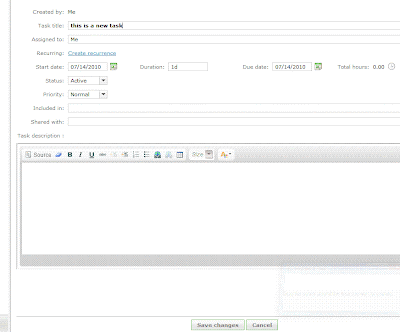

The “priority” field has 3 options - Normal, High and Low. This is a handy feature to be able to flag the task, but it does not make it go any higher in the list of tasks. A personal task list is ordered by due date, which makes sense at a basic level. If tasks need to be re-prioritized then the due dates need to be edited for each task individually, or the end dates adjusted via the timeline. I had fun dragging the little blocks around the timeline but the problem here is that the timeline is only as realistic as I set it to be. The timeline does not take into account the durations of tasks, the resources assigned to them and the other workload or work schedule of those resources, office holidays, etc. There is no way to see if any of the tasks are at risk of being completed by their due date, until they are actually overdue and then they turn red.
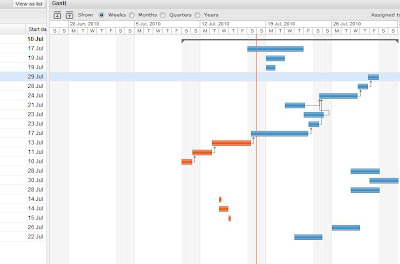

With LiquidPlanner, making a task highest priority is done simply by dragging it to the top of the task list. When this happens, the expected completion date for that and all other tasks updates appropriately. The expected completion date takes into account the other tasks assigned to that resource, working schedule of the resource, delay until date, and any other outside dependencies. The date calculated and schedule created shows a much more realistic picture of when things will get done, not just when we hope they will get done. Any items that are risk of not being completed by their promise date will immediately turn red and will remain that way until priorities are shifted or dates revised.
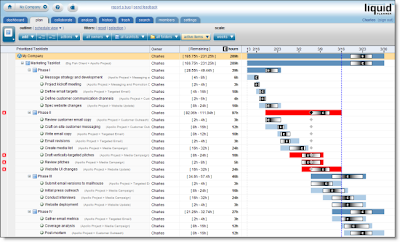

Wrike has a feature called “Flexible Structures”, which allows the manager to build hierarchies of tasks and simultaneously put a sub-project and a task in many projects. Tasks can be sorted in many ways. LiquidPlanner also allows the manager to organize tasks into a folder view and a task list view. So, projects are built and organized in the “Organize” view and then priorities are set and adjusted in the “Task” view.

Collaboration

Wrike has a “Discussions” tab for each task, and a tab where files can be uploaded. LiquidPlanner has additional levels of collaboration for each task, project folder, and root of the project. LiquidPlanner includes:
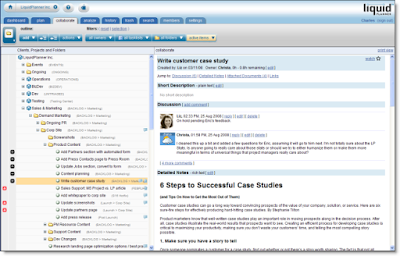
  • Description (plain text edit)
  • Discussion (Twitter type comment stream)
  • Detailed Notes (rich text edit)
  • Links
  • Attached documents


This keeps the collaboration rich & organized. Wrike is launching an “Activity Stream” feature with it’s new version, which will show all activity over all projects and also include comments or discussion. This is a nice way to watch everything but I didn’t see a way to sort this stream by project/user/etc.

LiquidPlanner has a client portal system, a great way to collaborate with clients while controlling exactly what they can view & edit. Wrike does allow clients to be invited to the workspace to view projects, but as far as I can tell there is no portal-type system setup with controls over what elements can be viewed, edited, etc.

Reporting

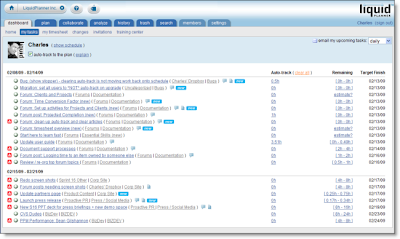
Wrike has a nice sized list of filters available, all prebuilt and accessible from the left column. This is handy, but what I personally find more practical and useful is the prebuilt (and very slick) reports and custom filters that can be setup with LiquidPlanner. LiquidPlanner includes the ability to sort by task owner, project folder, task list and status (active, complete, flagged, work remaining, etc).

LiquidPlanner has a free iphone app, Wrike reports to be working on their app.
Both systems include timesheets.

Summary

Although I found the Wrike interface clean and fairly easy to use, LiquidPlanner still has more of the features that are important to me in the type of project management work that I do, with constantly shifting priorities and tasks that need to need ranged estimates. And with all the talk of project collaboration tools, LiquidPlanner is pretty packed with great (and very organized) ways to collaborate.

What do you think?

Tuesday, March 16, 2010

Everything I Needed to Know about Risk Management, I Learned from my Kid's Daycare

Was picking up my kids at their after-school daycare early this evening, when I noticed a sign on their wall. It was titled "Emergency Response" and had a list of awful things that you'd never want to have happen to your kid, and how to handle them. My guess is that there is a state law that if a daycare that wants to maintain certification it needs to have a sign posted publicly that details what the response would be if say, a child were to -
  • choke on something
  • start vomiting or show flu symptoms
  • burn themselves on a stove (especially at an in-home daycare)
Even though I didn't want to think about any of these things happening to my children or anyone else's child at the daycare, I was comforted by seeing that these problems were recognized and addressed with a solution.

Posting this information in a public, central location seemed to me to be the perfect way to handle project risks. At the beginning of a project the team should meet to brainstorm on the 'Perfect Storm' - What are all the possible things that can go wrong and how are we going to handle them? This information should be shared with stakeholders and referenced/updated on a regular basis. The thing with risk management is that nobody wants to think about any of these things actually happening, everyone wants to be an optimist, and it's up to the project manager to be a pessimist and force the team to think of the worst case scenarios. Including this process of thinking through the risks and coming up with solutions should put people at ease, knowing that there is a plan in place to handle anything that comes their way. And even more so, posting the information in a public area will help to remind everyone that yes these risks are out there but we are prepared for them if and when they present themselves.

Wednesday, July 8, 2009

Some Simple Lessons in Project Management, from Edward of Sir Topham Hatt's Railway


We watched a lot of Thomas & Friends over the holiday weekend (yes, with my kids...wow, that joke never gets old). Since I don't watch the show regularly (not kidding here) I was surprised to learn about how many different trains there were. I always heard about 'Thomas the Train" and didn't hear much about his other friends. Anyway, one of the episodes featured Edward, who had to take over Percy's mail route because Percy was getting repaired. Edward didn't want to ask about how Percy delivered the mail, he assumed someone would tell him or he would figure it out.

As he started on the route, he had three deliveries to make. He guessed his way through and got all three deliveries wrong. When he got to the end of the route, he was told that the deliveries were wrong and he had to go back and bring all of the packages to the correct places. At this point he's running out of time, so he rushes through the pickup and drop-off, and ends up losing & breaking packages. By the end of the day he's very frustrated and the other engines are disappointed in him.

So the lessons learned here are pretty simple...

  1. Never assume that you completely understand the task at hand. It might seem simple at first, but once you're in the thick of it, questions might come up that you won't be prepared to answer unless you have a full understanding of the task.
  2. Don't be afraid (or too proud) to ask for help. This doesn't just happen to trains, people will sometimes have pride issues, too. Better to ask what might seem like a stupid question now than look even more foolish later.
  3. Rushing doesn't pay! What you gain in time you lose in quality.

Do you have any Edward trains on your project teams? Better make sure they watch this episode!

Wednesday, June 10, 2009

A Lesson in Risk Identification, from the Very Worried Walrus


Just got a shipment of old school children's books from my in-laws a few weeks ago (yes, we have kids, I don't just read kid's books for fun or blog material). One of the books is "The Very Worried Walrus", by Richard Hefter. This was one of my husband's favorites, but I had never read it before. So, when I read it to my daughters for the first time, it got me thinking about Risk Identification.

Let me tell the story....

Worried Walrus really wants to ride a bike, but is afraid he'll fall off. He has a conversation with "Positive Pig" about why he's worried...

"If I fall off, I'll get hurt. Then I'll have to go to the doctor. And I'll need medicine orbandages....or...stitches! Ohhhh!"

To which Positive Pig replies, "That's silly, bicycle riding is fun and there is no reason to worry."

The Worried Walrus goes on, "An awful lot can go wrong. You have to steer and pedal and balance. You have to look out in front of you and on both sides and make sure nowone is behind you...and not go too fast...and use your brakes."

Reading further, we understand why the Worried Walrus has his title, "...If I get hurt, they'll have to take me to the hospital in an ambulance. I can see it now, there's a traffic jam on Main Street. The ambulance get's stuck..."

And he ends up in the middle of nowhere walking through the rain in a dark night, wet and hungry and looking for anyone who can help him.

I won't give away the rest of the story, you should pick up the book and find out for yourself!

But, I think this is a great example of Risk Identification. This is the process of discovering, defining and documenting risks before they become a problem in a project. The way I see it, the more creative you can be about it, the better. The project team should sit down and brainstorm on all of the possible risks to the project and get them documented. The document should detail the risk, the severity, impact and contingency plan (here's a sample Risk Management Worksheet from the Gantthead site). At regular intervals throughout the project the team should revisit these risks, add new ones and archive anything that is no longer a risk. I recommend reading "Waltzing With Bears: Managing Risk on Software Projects" to find out more about risk management.

The goal of this is not to be worried like the Worried Walrus. Actually the opposite, the more creative thinking you can do in the beginning of the project to identify and then manage the potential risks, the less stress you will have and more sleep you will get at night.

So, I tried to have this same discussion with my 2 and 4 year old after reading the book to them and well...maybe I'll try again in a few more years.

Sunday, July 27, 2008

My Failed Project, and Lessons Learned

I'll probably come up with a couple more posts about my contracter before this is all over, he's finally back in touch and doing some work for us. It's always interesting having him around, especially when I can reflect on how work we do with him can relate to good or really bad project management.

This time I might as well take the blame.

We asked Fernando to install two wall unit air conditioners in each of our daughters small and stuffy rooms. For reasons I wont go into, window unit A/C's were not an option and fans weren't cooling down the rooms enough (nothing like getting woken up at 2am by a very sweaty baby, I felt terrible about it and we had to fix it as soon as possible).

So, what went wrong? Well, the air conditioners were cemented into the walls and put through to the back, but without a sleeve to hold them. So, two big problems here - the mechanics in the back of the A/C are exposed and not protected by the elements, and there is no easy way to remove the A/C if and when it breaks down. How did this big (expensive) mistake happen? A serious of bad decisions...

Let's start with the purchase of the appliances. My husband (who is a wonderful father and very intelligent and talented in his field of English Literature, but not exactly a handy fixit kindof guy) went to buy the wall units. Ideally we would have went online beforehand and picked out exactly what we wanted and done the research to help us figure out what accessories we needed, but we didn't.

Mistake #1: Lack of research & planning.

We rushed to get the A/Cs so that Fernando's guy could install them ASAP, and before the next brutal heatwave. Apparently wall units are sold without the sleeves, because they assume you might already have one in the wall. So, the sales guy was happy to sell us the A/C, but when my husband asked if he needed anything else, the guy said absolutely not.

Mistake #2: Bad communication and transfer of knowledge (assuming that the sales guy knew exactly what our situation was and would know enough to make the right recommendations).

So, we purchased two nice new wall unit A/Cs and brought them home (without the sleeve, of course). Fernando came by to look it over and raised the red flag. He said we bought the wrong thing, these were without a sleeve and we could not put them into the wall without one. I think it was morning when we came to this realization, and I was juggling getting the girls dressed and fed and getting my own stuff together so that I could get everyone where they needed to be and myself to work on time, and had not planned for this little hitch in my schedule. So, I wasn't focusing enough on the problem and trusted that Fernando would be able make everything ok. We looked through the box and took out all the pieces. I asked Fernando if there was any way to make it work, or what we should do. He said he'd figure something out. Sounded good to me... I dashed downstairs, fed the girls and got us all out the door.

Mistake #3: Rushing the schedule and not taking the time to properly reflect on the issue at hand and manage the new risks of the project.

So, Fernando's guy (who is an electrician by trade and not an A/C installation expert) started working on putting the holes in the wall. Within a couple of days the units were in the wall. The units were cemented back in, so no chance of anything sliding out. When I went to look at the work that was done, it was only then that I realized how important that sleeve was, because I saw the 3-4 inches of mechanics exposed in the back of the A/C. I asked Fernando if this was going to be a problem and he said only in the winter. So, he promised to get it covered by winter.

The next day my neighbors (one of whom is an expert in heating & air conditioning I have recently learned) raised about 10 red flags and told me that we needed to cover that A/C as soon as possible, before the first rain. So, now I have my contractor (who I've trusted for many years) telling me one thing and our neighbors (who we also trust) telling me another. I'm just using common sense here and figuring my neighbor is probably right. Another issue that my neighbor mentioned and I'm kicking myself for not realizing sooner is that if we ever needed to remove the unit, we'd have to break through all that concrete. Without a sleeve, there's no easy way to get the units out of the wall.

So, what was the end result? We cut our losses and decided that rather than remove both units from the wall now to put in a sleeve (and risk breaking the new units while separating from the concrete), we'd cover the exposed parts of the units and 5-10 years from now (hopefully not sooner) when they break down for good, we'll break the concrete and put the sleeves in.

I regret not spending more time to properly think the whole process through and expecting that each player would know exactly what to do. At this point I'm just keeping my fingers crossed that the units aren't damaged by the rain we've had in the last couple of weeks and we can atleast salvage our investment.

The bright side is that I learned some great lessons. I try to be super careful with planning, risk management and communication with the software projects I manage from 9 to 5 (I only wish it was from 9 to 5!) but maybe it's time to be more careful with the stuff that happens after 5.

Thursday, June 5, 2008

The limits of quality, in a crane

I walked past a crane yesterday. I have to say, being New Yorker and hearing a little too regularly about the construction accidents that have been happening, makes me not want to walk so close to those cranes.

There were a few construction accidents earlier this spring, one of them involved a crane that was improperly secured to a building, falling onto a neighboring building. Very recently, a crane on 1st Ave and 91st Street collapsed onto a 23 story building and killed the crane operator.

Many critics will say that the problem is that there is too much construction going on and too much rushing to get the projects done. Seems to make sense to me, especially after reading about the repeated complaints and stop-work orders on that crane that collapsed most recently. If there was not such an urgency to get these new high rises up, then maybe the project could have stopped and the crane properly evaluated and replaced.

I've been especially sensitive to these types of issues lately because I've been reading the very interesting book titled "The Challenger Launch Decision: Risky Technology, Culture, and Deviance at NASA", by Diane Vaughan. It's a slow but very interesting read, and from what I've got so far it's about the 'production' pressures faced in the organization and the 'amoral' judgement and behavior used by the managers there. In both of these cases, the team just wasn't cautious enough, or chose to ignore the warning signs.

What stunned me was the statement New York Mayer Bloomberg made after the accident, something like (not exact quote) "there are only so many inspections that can be made and so many inspectors, sometimes problems aren't caught." When it comes to ensuring the quality of your system when the failure of that system can mean loss of human life, then the warnings have to be taken extremely seriously. I'm not exactly an insider in the construction world, but it looks like the warning signs were not taken seriously enough.

In my software projects we take quality assurance and control seriously and are trying to find ways to improve what we're doing.

Do we miss things?
Of course!

Do we put new bugs into the system when we launch a new project, I think I've got a perfect record on that one, there's always something we have to fix post launch. I'm happy to be in the field where a bug in my system will not cause the loss of human life. I guess I expect a little more from the more dangerous fields of work out there.

Tuesday, June 3, 2008

The Good, the Bad, and the Ugly: The Reality of Risks in Your Projects

I just finished a great book, titled "Waltzing with Bears, Managing Risk on Software Projects" by Tom DeMarco and Timothy Lister. Risk is something we all deal with in our day to day lives, and probably don’t deal with enough in our professional work. The authors open with the idea that if a project doesn’t have any risk to it, it’s just not worth taking. This notion is especially applicable to the interactive design field that I work in at Flightpath.


The authors share the analogy presented by risk management expert Bob Charette, who proposes imagining your company and its competitors as a set of down escalators.

“You are obliged to climb up the escalator, which is moving against you. And your competitors are doing the same thing on theirs. The faster their stairs move, the faster everyone has to climb to stay even. If you pause, even for a moment, you begin to fall behind. And, of course, if you pause for too long, you will drop off the bottom, no longer able to compete…

Competitors get to enter their escalators halfway up. Falling behind, then, guarantees that the new competition will enter above you.

At the top of each escalator is a level that will allow you to control the speed of not just your escalator, but of everyone else’s as well. If you’re the first to reach the lever, that shows that you’re a better climber than your competitors. So, you can speed up all the stairs so that you can stay even but your competitors can not.

…This is an era in which risk-taking is rewarded, leaving companies that run away from risk as a plunder to be divided up by the others.”

But taking on the most innovative and thus risky projects is not all about being the sexiest agency out there; risks have to be managed. To take on a risky project without a formal plan in place to manage those risks is taking a major gamble with your project, your stakeholders, and maybe even your career.

The book states that risk management is like project management for adults. Something which adults have that children don’t is a willingness to confront the unpleasantness in life, from the little annoying things to the cataclysmic (examples such as putting a band-aid on a cut to keep it from getting infected, or taking out life or home-owners insurance policy as protection against the bigger challenges). Taking note of bad things that can happen and planning for them accordingly is a mark of maturity.

What can you do to make your project sexy (and of course risky) at the same time? Examples are trying out a new technology, working with a third party application that does some incredibly cool stuff, or doing something that nobody else out there has done before. Then there are the core risks that any project (no matter how un-sexy) can have, the book lists these five core project risks:

- schedule flaw, interruption

- scope creep

- turnover

- specification breakdown

- under performance

To ignore any of these is as disservice to your project team, your stakeholders, and yourself.
But risk discovery and planning can be an unpopular task and can make the risk identifier look like a ‘can’t-do’ person or a whiner. Risk management makes a limited amount of can’t-do thinking okay. It’s better to raise the issues early on and be prepared for them if and when they come, then to ignore them entirely.

So, I’m ready to become more of a can’t-do person, and ready to be more prepared for anything good or bad that will come my way. I hope that you’ll join me, and I’ll see you on the escalator!