Thursday, October 14, 2010
Been quiet around here, cause I've been blogging over at LiquidPlanner...
My latest posts on the LiquidPlanner blog -


Tuesday, July 20, 2010
LiquidPlanner vs. Wrike, the Battle of the Online Project Management Tool Continues
Next in my little battle for the title of the best project management tool, I took a look at Wrike and compared it to LiquidPlanner. If you’ve read any of my posts before you know that the battle is a little uneven, I am clearly biased towards LiquidPlanner but I do try to take a fair look at each tool. I also like to keep this as a friendly forum for discussion, so if anyone out there from Wrike wants to pop in a comment here and clarify anything about my descriptions, feel free.
I will be comparing the following features:
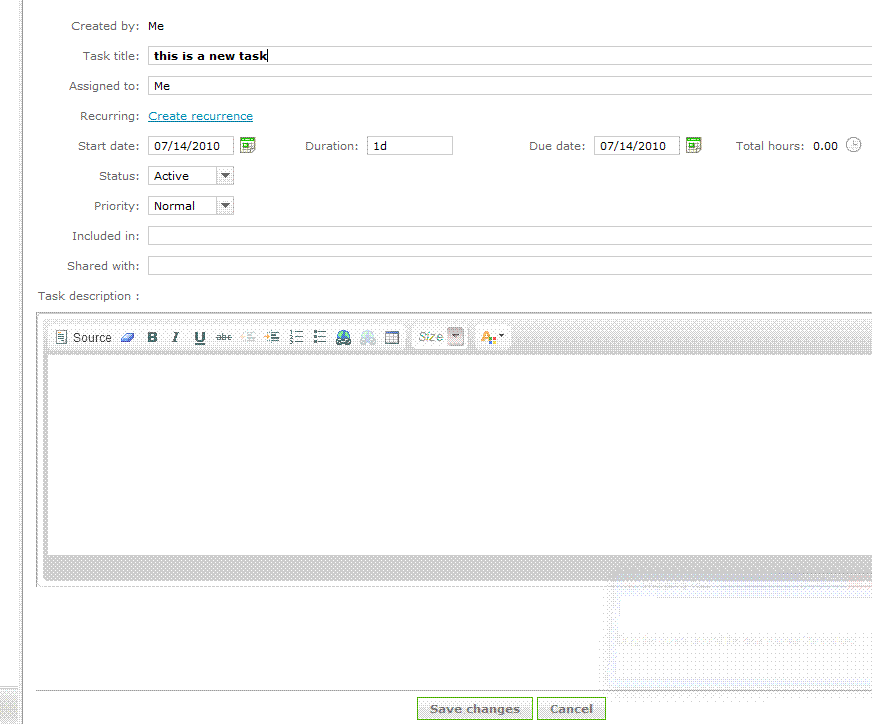
Creating new tasks is pretty quick and simple with Wrike, I specify a title, assignee, start and due date, duration, status, priority, included in, shared with, and description with a rich text edit box. I am allowed to set a recurrence on the task, which is kind-of handy. The duration is a single-point estimate of course. I have yet to find a project management tool that will allow me to have a ranged estimate for a task like LiquidPlanner does. This builds in a level of uncertainty into the schedule which is critical to keep projections realistic, and will keep the project manager from continually going back to revise the schedule when estimates change.
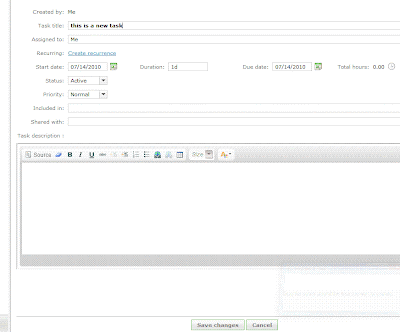
The “priority” field has 3 options - Normal, High and Low. This is a handy feature to be able to flag the task, but it does not make it go any higher in the list of tasks. A personal task list is ordered by due date, which makes sense at a basic level. If tasks need to be re-prioritized then the due dates need to be edited for each task individually, or the end dates adjusted via the timeline. I had fun dragging the little blocks around the timeline but the problem here is that the timeline is only as realistic as I set it to be. The timeline does not take into account the durations of tasks, the resources assigned to them and the other workload or work schedule of those resources, office holidays, etc. There is no way to see if any of the tasks are at risk of being completed by their due date, until they are actually overdue and then they turn red.
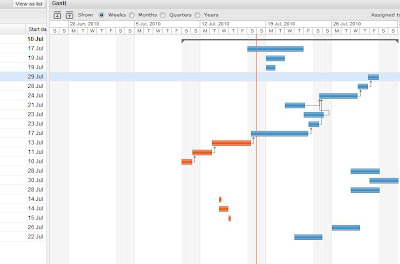
With LiquidPlanner, making a task highest priority is done simply by dragging it to the top of the task list. When this happens, the expected completion date for that and all other tasks updates appropriately. The expected completion date takes into account the other tasks assigned to that resource, working schedule of the resource, delay until date, and any other outside dependencies. The date calculated and schedule created shows a much more realistic picture of when things will get done, not just when we hope they will get done. Any items that are risk of not being completed by their promise date will immediately turn red and will remain that way until priorities are shifted or dates revised.
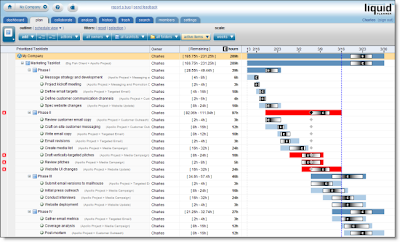
Wrike has a feature called “Flexible Structures”, which allows the manager to build hierarchies of tasks and simultaneously put a sub-project and a task in many projects. Tasks can be sorted in many ways. LiquidPlanner also allows the manager to organize tasks into a folder view and a task list view. So, projects are built and organized in the “Organize” view and then priorities are set and adjusted in the “Task” view.
Collaboration
Wrike has a “Discussions” tab for each task, and a tab where files can be uploaded. LiquidPlanner has additional levels of collaboration for each task, project folder, and root of the project. LiquidPlanner includes:
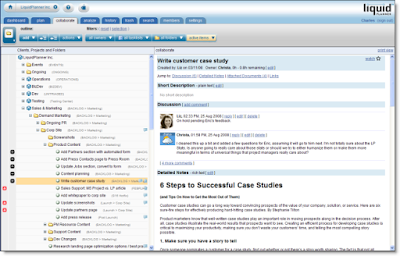
This keeps the collaboration rich & organized. Wrike is launching an “Activity Stream” feature with it’s new version, which will show all activity over all projects and also include comments or discussion. This is a nice way to watch everything but I didn’t see a way to sort this stream by project/user/etc.
LiquidPlanner has a client portal system, a great way to collaborate with clients while controlling exactly what they can view & edit. Wrike does allow clients to be invited to the workspace to view projects, but as far as I can tell there is no portal-type system setup with controls over what elements can be viewed, edited, etc.
Reporting
Wrike has a nice sized list of filters available, all prebuilt and accessible from the left column. This is handy, but what I personally find more practical and useful is the prebuilt (and very slick) reports and custom filters that can be setup with LiquidPlanner. LiquidPlanner includes the ability to sort by task owner, project folder, task list and status (active, complete, flagged, work remaining, etc).
LiquidPlanner has a free iphone app, Wrike reports to be working on their app.
Both systems include timesheets.
Summary
Although I found the Wrike interface clean and fairly easy to use, LiquidPlanner still has more of the features that are important to me in the type of project management work that I do, with constantly shifting priorities and tasks that need to need ranged estimates. And with all the talk of project collaboration tools, LiquidPlanner is pretty packed with great (and very organized) ways to collaborate.
What do you think?
- Task Management / Schedule Building
- Collaboration
- Reporting
- Mobile & Misc
Creating new tasks is pretty quick and simple with Wrike, I specify a title, assignee, start and due date, duration, status, priority, included in, shared with, and description with a rich text edit box. I am allowed to set a recurrence on the task, which is kind-of handy. The duration is a single-point estimate of course. I have yet to find a project management tool that will allow me to have a ranged estimate for a task like LiquidPlanner does. This builds in a level of uncertainty into the schedule which is critical to keep projections realistic, and will keep the project manager from continually going back to revise the schedule when estimates change.
The “priority” field has 3 options - Normal, High and Low. This is a handy feature to be able to flag the task, but it does not make it go any higher in the list of tasks. A personal task list is ordered by due date, which makes sense at a basic level. If tasks need to be re-prioritized then the due dates need to be edited for each task individually, or the end dates adjusted via the timeline. I had fun dragging the little blocks around the timeline but the problem here is that the timeline is only as realistic as I set it to be. The timeline does not take into account the durations of tasks, the resources assigned to them and the other workload or work schedule of those resources, office holidays, etc. There is no way to see if any of the tasks are at risk of being completed by their due date, until they are actually overdue and then they turn red.

With LiquidPlanner, making a task highest priority is done simply by dragging it to the top of the task list. When this happens, the expected completion date for that and all other tasks updates appropriately. The expected completion date takes into account the other tasks assigned to that resource, working schedule of the resource, delay until date, and any other outside dependencies. The date calculated and schedule created shows a much more realistic picture of when things will get done, not just when we hope they will get done. Any items that are risk of not being completed by their promise date will immediately turn red and will remain that way until priorities are shifted or dates revised.

Wrike has a feature called “Flexible Structures”, which allows the manager to build hierarchies of tasks and simultaneously put a sub-project and a task in many projects. Tasks can be sorted in many ways. LiquidPlanner also allows the manager to organize tasks into a folder view and a task list view. So, projects are built and organized in the “Organize” view and then priorities are set and adjusted in the “Task” view.
Collaboration
Wrike has a “Discussions” tab for each task, and a tab where files can be uploaded. LiquidPlanner has additional levels of collaboration for each task, project folder, and root of the project. LiquidPlanner includes:
- Description (plain text edit)
- Discussion (Twitter type comment stream)
- Detailed Notes (rich text edit)
- Links
- Attached documents

This keeps the collaboration rich & organized. Wrike is launching an “Activity Stream” feature with it’s new version, which will show all activity over all projects and also include comments or discussion. This is a nice way to watch everything but I didn’t see a way to sort this stream by project/user/etc.
LiquidPlanner has a client portal system, a great way to collaborate with clients while controlling exactly what they can view & edit. Wrike does allow clients to be invited to the workspace to view projects, but as far as I can tell there is no portal-type system setup with controls over what elements can be viewed, edited, etc.

Reporting
Wrike has a nice sized list of filters available, all prebuilt and accessible from the left column. This is handy, but what I personally find more practical and useful is the prebuilt (and very slick) reports and custom filters that can be setup with LiquidPlanner. LiquidPlanner includes the ability to sort by task owner, project folder, task list and status (active, complete, flagged, work remaining, etc).
LiquidPlanner has a free iphone app, Wrike reports to be working on their app.
Both systems include timesheets.
Summary
Although I found the Wrike interface clean and fairly easy to use, LiquidPlanner still has more of the features that are important to me in the type of project management work that I do, with constantly shifting priorities and tasks that need to need ranged estimates. And with all the talk of project collaboration tools, LiquidPlanner is pretty packed with great (and very organized) ways to collaborate.
What do you think?
Thursday, June 24, 2010
Email vs. Stream for Ideal Project Communication

I spotted this interesting post by Dennis Stevenson titled "Why would you abandon e-mail for Streaming tools?", which was a reaction to an article by Stowe Boyd "The Business Case For Streams versus Email". Both are worth a read, and got me thinking about how we communicate and how our messages are received (or not received) by our team. The debate here is stream (public post on shared workspace, ie. twitter/yammer like communication) vs email.
It's funny because like what Stowe Boyd mentions in his piece, this is just the next debate over company communications. In the 70's and 80's there was the debate about email, and in the 90's web-based email. I'm sure there was once a big debate about how and when to best use the fax machine, and then it was the greatest thing ever, and these days I just wish I could burn the thing.
Dennis Stevenson compares email to a hammer:
"pounding everything as if it were a nail. It's a useful tool, but not suited to every situation. Flow or Streams are a different tool, say a pair of pliers. If you've never used a pair of pliers and always used a hammer, you may not have a particularly good understanding of all the things you can do with pliers. This may call for experimentation and some trial/error. That's ok."
I would think that those who prefer to stick to email would say that when you send an email you'll be assured that the recipient will see it and read it. You can select exactly who will receive it. This might not be the case when posting something to the stream.
But that's not necessarily true. That message might never get to where it needs to be because:
- The email could get blocked or stalled by the occasional full mailbox, spam rule, down server
- The recipient could have email rules setup to file away specific messages into folders, this sounds great and very organized but if the filing is happening before the email is being read than it's possible that email might get missed
- The recipient might accidentally delete the message while batch deleting the junk mail from the night before (hasn't everyone had one of those "Who just sent me an email? I just deleted by accident!" experiences, where you send a note out to everyone you can think of asking who just sent you an email?). This is less of a problem these days now that mail can more easily be retrieved from the trash, but it could still happen.
- The recipient might just choose not to read the email from you (in this case there are some other 'personnel' problems that should probably be tackled first).
So for any of these reasons the message is lost, deleted forever or buried in a pile of other messages, never to be read. When it’s something important it’s always good to follow up via some other form of communication (phone, instant message, tap on the shoulder, dart-gun, etc.) but it’s better when the message gets to where it needs to go in the first place. Even when it does get there, it’s not always ideal to have it sitting in one person’s inbox, more on this below.
When a message is posted to the ‘stream’ (via Twitter hashtag, Yammer, or Yammer-style communication tool embedded within the LiquidPlanner online project management system) there are ways to direct the message to a specific person or group of people, and it’s also just out there open for the public. Is the message sitting in someone’s inbox? Well, it can be if there are email alerts setup for messages and in some cases those hesitant to change can even use their email to participate in the discussion on the stream. Unless it’s strictly confidential information (and in this case even email might not be the best option) I think having the message on a shared system, in the stream, is much better solution long term. What it really takes is a cultural shift, having a team that treats the stream like they used to (hopefully) treat their email - keeping the application or browser window open, referring to the stream first when they are looking for something (rather than checking email, wiki, or other notes). Posting information on a shared system means that information will never get lost with one person, or in one person’s email folders. This will help with remote teams, or if someone is unavailable or leaves the organization. Posting to the stream means that critical details are always publicly accessible if an ass needs to be covered at some later point in the project. Although there is a problem that with some tools the messages might not be retrievable after a certain period of time (mentioned in the 2nd comment on the Boyd post). Because of this Twitter might not be the best tool for project communications.
One of the features I like best about the LiquidPlanner online project management tool is that the chatter can be easily organized by project task, sub-folder, or on the root of the project or client. There is no issue of older comments being deleted and the details specific to a task will always be stored where it can be easily found, with that task.
Communication is a critical element of project success, and as the team grows the number of possible communication channels multiplies ( N x ( N-1 ) / 2, where N is the number of stakeholders). I believe that using the stream is the easiest and most efficient way to cover all of those communication channels and ensure that the important details are available anytime and for anyone.
Saturday, May 15, 2010
It's All About the Plan, Right?
This brings back somewhat painful memories of a large project post-mortem where the CEO continually asked "Well, was there a project plan?" (and didn't ask anything else). In this specific case, there was a decent project plan, but so many other things (that the CEO chose not to acknowledge) went wrong that the project plan was not able to salvage the project.
Jim Vaughan, in the IT Project Management Blog, also asks (from a much more informed perspective of course) why so many projects with a project plan are failing? His explanation is that too many project managers will open up their slick & sophisticated PM tools and start entering tasks, since the task list is the first thing they will see. This process is a more bottom-up approach (or inside-out, as he says).
His solution to this problem:
...is not the tool but rather the methodology that the PM chooses to use for the development the project plan. The best way that I have found to do this is to gather the technical experts together in a large room with a blank wall. Together, under the leadership of the project manager, using sticky notes, create the WBS from the top down on the blank wall. From there the data can be entered into the tool of choice. This methodology will produce a much more effective plan.
Agreed, that working together with the experts will lead to much more accurate and reliable project plan, but let's not discount the advantage that a powerful project management and collaboration system can give the project leader in setting up and maintaining the plan throughout the project. With web based project management software where all team members can log in and collaborate on each task in the project, the project plan will no longer be something that one person maintains in their own little bubble (like I used to, back in my MS Project days). With a system that allows team members to estimate their tasks in ranges and add new tasks once issues crop up or new challenges arise, the project plan will continuously be relevant.
 So, take Jim Vaughan's good advice in building your next project plan, but make sure when you do that you are using a project management tool (albeit somewhat slick) that will allow you to keep your experts engaged and connected throughout the project.
Jim Vaughan, in the IT Project Management Blog, also asks (from a much more informed perspective of course) why so many projects with a project plan are failing? His explanation is that too many project managers will open up their slick & sophisticated PM tools and start entering tasks, since the task list is the first thing they will see. This process is a more bottom-up approach (or inside-out, as he says).
His solution to this problem:
...is not the tool but rather the methodology that the PM chooses to use for the development the project plan. The best way that I have found to do this is to gather the technical experts together in a large room with a blank wall. Together, under the leadership of the project manager, using sticky notes, create the WBS from the top down on the blank wall. From there the data can be entered into the tool of choice. This methodology will produce a much more effective plan.
Agreed, that working together with the experts will lead to much more accurate and reliable project plan, but let's not discount the advantage that a powerful project management and collaboration system can give the project leader in setting up and maintaining the plan throughout the project. With web based project management software where all team members can log in and collaborate on each task in the project, the project plan will no longer be something that one person maintains in their own little bubble (like I used to, back in my MS Project days). With a system that allows team members to estimate their tasks in ranges and add new tasks once issues crop up or new challenges arise, the project plan will continuously be relevant.
 So, take Jim Vaughan's good advice in building your next project plan, but make sure when you do that you are using a project management tool (albeit somewhat slick) that will allow you to keep your experts engaged and connected throughout the project.
Thursday, April 29, 2010
LiquidPlanner vs. Clarizen, a comparison of two Project Management Tools
 Since I've been serving proudly as the LiquidPlanner Social Media Evangelist for almost a year now, I wanted to take some more time to evaluate other online project management tools and get a better understanding of what the competition is like in the space. This post will not be another comparison of Basecamp, I think I've made it pretty clear that Basecamp shouldn't even really be called a project management tool, but merely a decent collaboration system, lacking in critical project management features & functionality.
Clarizen
 was next on my list, so I spent some time checking it out. The interface is fairly clean and loading time is decent, but my first real impression was how much it looked like a web based version of MS Project. Personally, that scares me, but it might be a draw for others.
Both tools have task & resource management, time tracking, collaboration, gantt view, reporting, and a way to include clients in project collaboration. Clarizen also has a fairly full suite of Budget Management tools which LiquidPlanner does not yet have.
What I spent the most time evaluating was task scheduling and management, since I think these are the most powerful features of LiquidPlanner and I'm always curious to see how other systems handle them.
To setup a task in Clarizen, you need to have a start and end (due) date, duration and work. The first thing I noticed is a default task in the system that is 40 hrs of work, assigned to one person, and set to last 5 working days. I changed the work to 60 hrs and the other values didn't change, and there was also no flag that the task was at risk of not being met. In LiquidPlanner, to setup a similar task I would give it a "delay until" date, promise date, high/low work estimate and put it in the proper priority order. From here, LiquidPlanner will calculate expected finish date, based on the hours per week that the resource works, any other tasks in the workload, and of course the amount of hours the task is expected to take. If I take a 40 hour task and make it into a 60 hour task on LiquidPlanner, the expected finish date would automatically get pushed back to the following week. Tasks can be due on a certain date, but I can't force them to finish on that date without moving up the 'delay until' date and/or re-prioritizing tasks. And, I really like that feature of LiquidPlanner, because it communicates the reality of the schedule, that you can't always force something to be done by a certain date (unless you want to sacrifice quality, quantity, other work, your team member's sanity, I could go on...).
 Next, I wanted to reprioritize the tasks assigned to one of my team members. I found on Clarizen that it took a lot of clicks to get to the list of tasks for one specific user, then once I was there I was not able to easily shift (drag & drop) tasks around like I am able to do with LiquidPlanner. Now, this feature is very important to me because where I work there are constantly shifting priorities so I need to be able to easily move the tasks around to ensure that the critical items get finished on time. Clarizen does allow tasks to be reordered on a team member's list, but it takes a couple more steps than the drag & drop.
In Clarizen the tasks can be given the designation 'at risk' but it looks like this must be done completely manually and not automatically if the resource assigned to that task is overloaded with work. With LiquidPlanner, tasks are automatically marked 'at risk' by the system if the promise date is after the expected finish date. The task can also manually be marked at risk or assigned any other relevant alert.
 Something interesting about Clarizen was the ability to assign multiple properties to a task, such
as Project Phase, Pending (Customer approval, feedback, testing, etc) and Type (Define, Design, General, Integration, etc.). What I didn't see was a way to customize the items in these drop-down lists, so the user is tied to these specific properties.
I've heard many seasoned project managers say (and even some programmers guiltily admit) that a task is always going to be reported as 90% complete, until it's finally finished. There are many who adhere to the idea that tasks are either 0% or 100% complete, and never anything in the middle. Percent complete is just an inaccurate way to report progress on a task. Rather, report hours worked and estimate (high/low is ideal, of course) of hours to complete. So, I admit, I had to chuckle when I saw that Clarizen was using a percent complete field with each task, and allowed me to arbitrarily update the value without recording any time worked or time remaining. LiquidPlanner stays away from the percent complete model, the only percentages you will see attached to a task is the calculated probability of a task being completed by a specific date. So, you can report to your execs that task A has a 10% chance of being finished by next Friday, a 50% chance of being finished by the following Wednesday, etc. In my opinion (and many other project managers) much more useful information than having the task owner report something like their task is "65% complete."
I mentioned at the beginning of this post that both tools have reporting features. If you look at the reports page on the Clarizen system and compare to the reports in LiquidPlanner, you might be blown away at the sheer number of reports available on Clarizen. What will become obvious after taking a closer look at LiquidPlanner is that many of these same reports are available, with even more customization, by using the drop-down lists in the "Plan" view to filter to the exact view that you're looking for. These custom views can be saved and easily accessed later. The prepackaged reports that LiquidPlanner does have are pretty slick, and Clarizen doesn't have the proper data to generate reports like that. To Clarizen's credit though, there are financial reports available in that system that are not yet in LiquidPlanner, but once LiquidPlanner launches additional financial tools this will not be an issue.
 The bottom line here is that it's all about what your needs are as a project manager and what type of organization you're working in. If you're looking for a tool that closely resembles a web based version of MS Project with added collaboration tools, then Clarizen might be a good fit. If you'd prefer something that removes a lot of the rigid structure of MS Project and includes only the most useful features (plus a robust scheduling engine, collaboration, etc), than LiquidPlanner would be an ideal solution for you.
Monday, April 19, 2010
No More Fear of Failure...
 (This was originally posted on Horn Group's Brass Tacks)
Last week I went to the first FAILfaire NYC, organized by MobileActive.org. I was first turned on to the event when I saw a tweet about it from another project manager that I’m connected with through the “Project Managers on Twitter” (#PMOT) group. Now, failure is nothing new to project managers, any quick skim through the #PMOT feed on a given day will show blog posts about “10 top ways to fail at an IT project”, or “5 ways to fail as a project manager”. Talking about common mistakes and lessons learned from them is something project managers try to do on a regular basis. But, I have never seen an event where people will submit their project failure stories in order to be able to stand in front of a large group of people and talk about how they screwed up. What an amazing idea!
Too often people are afraid to talk about their mistakes, both professional and personal. The problem here is that when we don't talk about them, we don't learn from them, we forget how they happened and then of course we go back and repeat them. This can be a dangerous and expensive habit when it comes to software and interactive projects. And, as we all learned from the presentations at FAILfaire, just as bad with "Information Technology for Development" projects.
What were the lessons learned from the projects presented at FAILfaire? Here's the main ones that I took from the event:
- A great idea and great branding will not necessarily lead to a great project. Plenty of time needs to be spent planning out all steps of the project from initiation to final execution, trying to brainstorm all possible bumps along the road and how they will be handled.
- Pay attention to early warning signs. The example from the project presented was where family members warned "not to give up your day job" and there was no funding offered from friends/family or charitable organizations. Regardless, the project forged on as planned.
- The people are just as critical as the technology and process. You might have an amazing idea but without a team of qualified people that is 100% motivated about the project, the challenges could be too much to bear.
- Make sure to do enough market research. In this specific case presented, plenty of time and resources were spent designing and producing an LED lamp that was already more cheaply made and available in the local area.
- Especially when dealing with developing nations, make sure to think through the technology challenges as fully as possible. The level of technology use and infrastructure is nowhere near what we are lucky enough to have here in the U.S.
- Make sure you have complete buy-in from your audience. If you need a crowd of people (and in one of the cases presented, children) willing to participate make sure they have incentive and no significant barriers to participation.
I think the best idea that came from the event is the extendability of it. The organizers mentioned more than once that the logo was free to reuse and they would love to see more FAILfaires sprout up in other cities and with other industries. And if done well like it was last week in New York, I think this could be a huge success. The keys to a successful FAILfaire are:
- Make sure the environment is comfortable and conducive to open conversation (at the NYC event the alcohol was flowing, while the sunset came in all around the stunning penthouse location).
- Fingers should not be pointed at any time during the event. This is not a time to lay blame, but learn from mistakes that anyone can make.
- Set clear ground rules early about what is on and off the record, especially when participants are coming from different organizations and industries. In the age of live tweet streams and blogging (this post is even on the late end), try to ensure that any sensitive information is either left out entirely or clearly declared off the record.
I already have a couple of ideas for how I'd like to see FAILfaire spread, and I hope the 60+ people in attendance that night also help start more events in their own circles, helping to bring out the failures from under the rug so that we can all learn from them.
Tuesday, March 16, 2010
Everything I Needed to Know about Risk Management, I Learned from my Kid's Daycare
 Was picking up my kids at their after-school daycare early this evening, when I noticed a sign on their wall. It was titled "Emergency Response" and had a list of awful things that you'd never want to have happen to your kid, and how to handle them. My guess is that there is a state law that if a daycare that wants to maintain certification it needs to have a sign posted publicly that details what the response would be if say, a child were to -
- choke on something
- start vomiting or show flu symptoms
- burn themselves on a stove (especially at an in-home daycare)
Posting this information in a public, central location seemed to me to be the perfect way to handle project risks. At the beginning of a project the team should meet to brainstorm on the 'Perfect Storm' - What are all the possible things that can go wrong and how are we going to handle them? This information should be shared with stakeholders and referenced/updated on a regular basis. The thing with risk management is that nobody wants to think about any of these things actually happening, everyone wants to be an optimist, and it's up to the project manager to be a pessimist and force the team to think of the worst case scenarios. Including this process of thinking through the risks and coming up with solutions should put people at ease, knowing that there is a plan in place to handle anything that comes their way. And even more so, posting the information in a public area will help to remind everyone that yes these risks are out there but we are prepared for them if and when they present themselves.
Subscribe to:
Posts (Atom)